
怎么將excel導入oracle數(shù)據(jù)庫?excel導入oracle數(shù)據(jù)庫圖文講解

這種方法是通過PL/SQL dev工具導入的,步驟簡單,但是對于一些大數(shù)據(jù)文導入可能會比較慢,以后會介紹sqlldr命令方式導入。以下是借鑒網(wǎng)絡內容,本人親測可行。

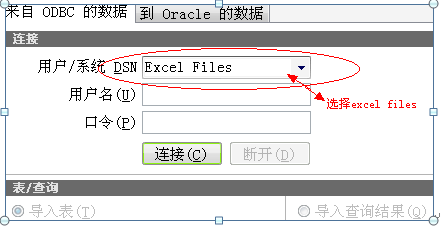
1、 打開plsql的odbc導入其

路徑:工具/ODBC導入器
怎么將excel導入oracle數(shù)據(jù)庫?excel導入oracle數(shù)據(jù)庫圖文講解-1

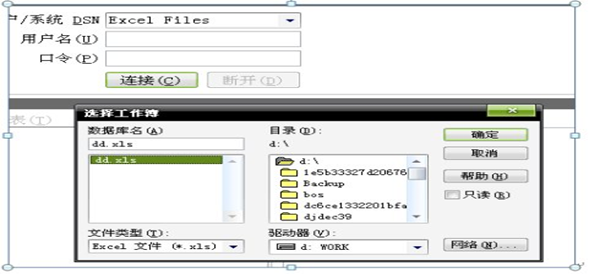
2、 點擊連接按鈕,然后選擇要導入的exce(表中必須要有字段標題,跟數(shù)據(jù)庫表中的一致)
怎么將excel導入oracle數(shù)據(jù)庫?excel導入oracle數(shù)據(jù)庫圖文講解-1

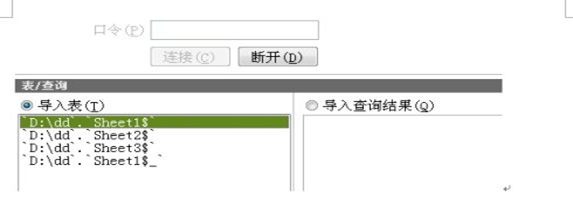
3、 選擇excel的sheet

怎么將excel導入oracle數(shù)據(jù)庫?excel導入oracle數(shù)據(jù)庫圖文講解-1

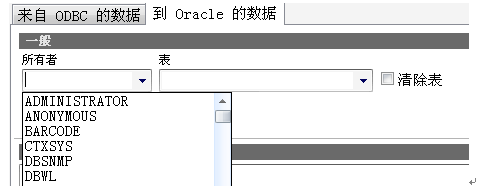
4、 選擇數(shù)據(jù)庫用戶和數(shù)據(jù)表

怎么將excel導入oracle數(shù)據(jù)庫?excel導入oracle數(shù)據(jù)庫圖文講解-1

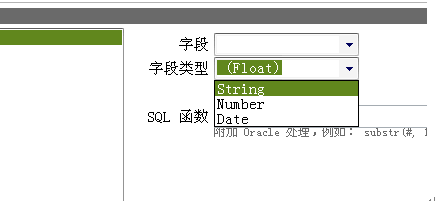
5、 選擇數(shù)據(jù)表中對應的字段,并選擇類型(類型一定要對應上,否則不能導入
怎么將excel導入oracle數(shù)據(jù)庫?excel導入oracle數(shù)據(jù)庫圖文講解-1

6、完成字段的對應和類型匹配后點擊導入按鈕,即可將數(shù)據(jù)導入到數(shù)據(jù)表中

或者可以用

1.準備數(shù)據(jù):在excel中構造出需要的數(shù)據(jù)

怎么將excel導入oracle數(shù)據(jù)庫?excel導入oracle數(shù)據(jù)庫圖文講解-1

2.將excel中的數(shù)據(jù)另存為文本文件(有制表符分隔的)

怎么將excel導入oracle數(shù)據(jù)庫?excel導入oracle數(shù)據(jù)庫圖文講解-1

3.將新保存到文本文件中的數(shù)據(jù)導入到pl*sql中

在pl*sql中選擇tools–>text importer,在出現(xiàn)的窗口中選擇”Data from Textfile”,然后再選擇”Open data file”,

怎么將excel導入oracle數(shù)據(jù)庫?excel導入oracle數(shù)據(jù)庫圖文講解-1

在彈出的文件選擇框中選中保存有數(shù)據(jù)的文本文件,此時將會看到data from textfile中顯示將要導入的數(shù)據(jù)

怎么將excel導入oracle數(shù)據(jù)庫?excel導入oracle數(shù)據(jù)庫圖文講解-1

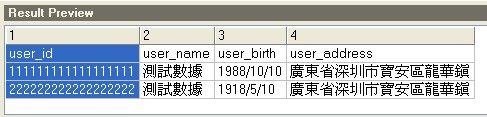
4.在configuration中進行如下配置

怎么將excel導入oracle數(shù)據(jù)庫?excel導入oracle數(shù)據(jù)庫圖文講解-1

注:如果不將”Name in header”勾選上會導致字段名也當做記錄被導入到數(shù)據(jù)庫中,從而導致數(shù)據(jù)錯誤
怎么將excel導入oracle數(shù)據(jù)庫?excel導入oracle數(shù)據(jù)庫圖文講解-1

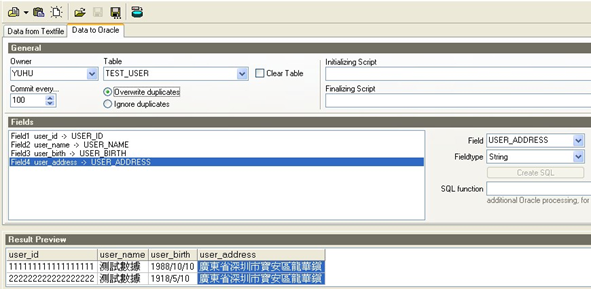
5.點擊data to oracle,選擇將要導入數(shù)據(jù)的表,并在fields中將文本中的字段與表中的字段進行關聯(lián)
怎么將excel導入oracle數(shù)據(jù)庫?excel導入oracle數(shù)據(jù)庫圖文講解-1

6.點擊import按鈕進行導入

怎么將excel導入oracle數(shù)據(jù)庫?excel導入oracle數(shù)據(jù)庫圖文講解-1

7.查看導入的數(shù)據(jù)

怎么將excel導入oracle數(shù)據(jù)庫?excel導入oracle數(shù)據(jù)庫圖文講解-1

OK,至此數(shù)據(jù)導入成功
? 版權聲明
THE END
喜歡就支持一下吧
點贊0 分享

暫無內容